
Global shipping settings explained
Settings → Shipping (section Global shipping settings) holds store-wide switches that change how every rate is calculated. This page explains each one.
Before you begin
Some rows only show for certain platforms or add-ons. Those are marked. If you don't see a row, it doesn't apply to your store.
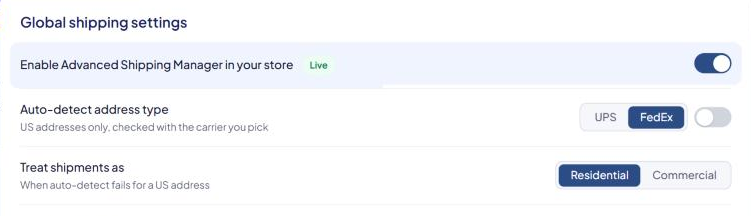
Turning ASM on
Enable Advanced Shipping Manager in your store
- The master switch for ASM's rates at checkout. The badge next to it shows Live or Not live.
- When it's off, every admin page shows "Advanced Shipping Manager is off" with a Turn it on button.
- See Turn ASM on (or off) at checkout.
Address type
Auto-detect address type — "US addresses only, checked with the carrier you pick"
- Pick UPS or FedEx and turn the switch on. ASM asks that carrier whether each US address is residential or commercial, and prices it that way.
- Needs a working connection to the carrier you pick.
Treat shipments as — "When auto-detect fails for a US address"
- Residential or Commercial.
- Used when auto-detect is off, when the carrier can't decide, and for addresses ASM doesn't check.
See Residential vs. commercial addresses.
Declared value
Declare value on shipments — "Carriers will include insurance"
- Sends each package's value to the carrier. Carriers add the cost of declared-value coverage to the rate, so rates go up.
Free shipping
These change how the Free shipping over amount on your shipping methods works. See Offer free shipping over an order amount.
Count the value of excluded products toward global free shipping
- Products marked Global free ship exclusion are normally left out of the order value that's compared with the free-shipping amount. Turn this on to count them.
Count free/flat shipping weights when free/flat shipping is applied
- Counts the weight of products that ship free or at a flat rate toward the cart weight your rules check.
Disable global free shipping if a coupon or promo code is used — Turbify, BigCommerce, Shopify and Miva
- When the shopper uses a coupon or promo code, free shipping doesn't apply.
Treat promotional discounts as coupons — BigCommerce only
- Counts BigCommerce promotions as coupons for the setting above.
Apply global free shipping if one product has free shipping set
- If any product in the cart is set to ship free, the rest of the cart ships free too on that product's free-shipping methods. Products marked Global free ship exclusion are still charged.
Subtract the coupon value before calculating min/max order value — Shopify and BigCommerce
- Uses the order value after coupons when checking your rules' minimum and maximum order values.
- If you also have the free shipping countdown bar, change this on Settings → Countdown Bar instead. It's the same setting. See Free shipping countdown bar.
Table amounts
Base table-amount shipping rules on
- Package value — each packed box is priced by the value of the products in it.
- Order value — the whole order's value picks the price.
Base table-amount markup rules on
- Package value, Order value or Shipping rate — what a table markup's amounts are compared with.
Add-on and platform settings
Consolidate products from the same origin — "When possible", Multiple Origins add-on
- Packs products that ship from the same origin together.
Sort applicable shipping methods by — Product Shipping Calculator, or the populator on Turbify
- Rate, Method name or Method number.
Automatically select the first applicable method in the populator — Turbify with the populator
- Preselects the first method for the shopper.
Use the points system instead of dimensions — Points System add-on
- Packs boxes by points instead of product dimensions. See Box mapping (points system).
Customers with tags/groups see only their own applicable methods — Customer Tags/Groups add-on
- A tagged shopper sees only the methods for their tag or group.
Grab dimension values from product data — BigCommerce only
- Takes product dimensions from your BigCommerce product data during product sync. The warning "This will affect product sync from now on." applies. See BigCommerce: take dimensions from product data.
Use the total instead of product pricing when Shopify splits packages — Shopify only
- The warning "This will disable product free shipping exclusions." applies.
Saturday delivery rule cut-off — "Central time"
- Shown only when you don't have a delivery estimate add-on. With one, the cut-off is in Settings → Delivery Estimates instead. See Show delivery dates at checkout.
Customer attribute ID — "For advanced users", some BigCommerce B2B stores
- If you see it and aren't sure what to enter, contact support.
Enable the duties and taxes module — Duties & Taxes add-on
- Adds duties and taxes for international shipments.
Saving
Select Save Settings. Remember that saving checks your General details too. See Settings: where everything lives.