
Offer free shipping over an order amount
Make a shipping method free when the order is over an amount, for example "Standard Shipping is free on orders over $75".
Before you begin
Steps
- Go to Shipping Rules and select Edit on any rule of the method, for example "Standard Shipping".
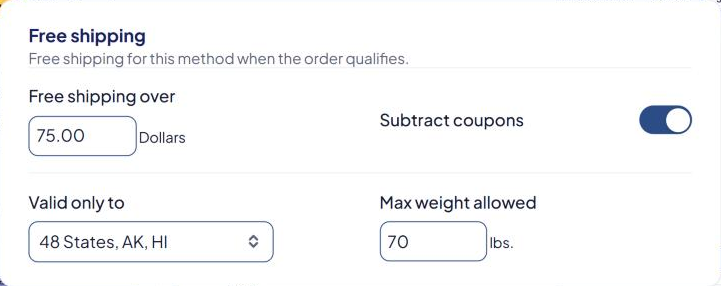
- Scroll to the Free shipping card.
- In Free shipping over, type the amount, for example
75. - Subtract coupons: leave it on to compare the order total after coupon and promo discounts. Turn it off to compare the total before discounts.
- In Valid only to, choose where the free shipping applies:
- 48 States (the default, includes DC)
- 48 States, AK, HI
- 48 States, AK, HI, Territories (also APO/FPO)
- All Countries
- Stores shipping from Canada or Australia see extra choices, such as Canada or Australia.
- Optional: in Max weight allowed, type a weight. Heavier carts aren't shipped free. Leave it empty for no limit.
- Select Save Rule.
These settings belong to the whole method. ASM copies them to every rule of the method.
- "Over" means more than. With
75, an order of exactly $75.00 isn't free. An order of $75.01 is. - Valid only to starts at 48 States. If you don't change it, shoppers in Alaska, Hawaii, US territories and other countries still pay.
What "free" means
- Products that qualify ship free on this method. If every product qualifies, the method shows at $0.
- Products marked Global free ship exclusion are still charged, and their value doesn't count toward the amount. See Free or flat shipping for a product.
- A Minimum charge doesn't raise a free $0 rate, and markups aren't added to it.
Don't set a minimum weight in When this rule applies on a method with Free shipping over. Free products' weight is left out of the cart weight, so the method can disappear once products become free. ASM warns you about this when you save.
Another way: a separate "Free Shipping" method
Some stores prefer a method called "Free Shipping" that appears only on big orders:
- Add a shipping rule with Method name
Free Shipping. - In When this rule applies, set Order value from
75.01(leave the second box empty). - In How it's priced, select Percentage or flat, and type
0in Flat rate to total. - Select Save Rule.
Order value includes the amount you type: from 75 would include an order of exactly $75.00. Use 75.01 to match "over $75".
To hide your paid method when "Free Shipping" shows, see Hide a method when another method is offered.
Settings that change free shipping
A few settings under Settings affect every method's free shipping, such as Count the value of excluded products toward global free shipping and Disable global free shipping if a coupon or promo code is used. See Global shipping settings explained.
Check that it works
In the Shipping Estimator, test two carts: one just under your amount and one just over it, to an address inside your Valid only to area. Only the second should be free. See Test your rates with the Shipping Estimator.
If it doesn't work, see Free shipping isn't applying.