
Test your rates with the Shipping Estimator
The Shipping Estimator quotes any cart to any address, without placing an order. Use it after every rule change, and whenever a shopper reports a wrong or missing rate.
Steps
- Go to Shipping Estimator in the ASM menu, or select Test your rates → on the Dashboard.
- Under Ship to:
- Enter the ZIP code (it says postal code for other countries).
- Choose the Country.
- Choose the Address type: Residential or Commercial. It starts on your store's default.
- Under Products:
- Type the product's Product SKU (Shopify and BigCommerce) or Product ID (Turbify and most other platforms). After two characters, matching products are suggested. Pick one.
- Set the Quantity.
- Select Add another product for each extra product in the cart.
- Select Calculate rates.
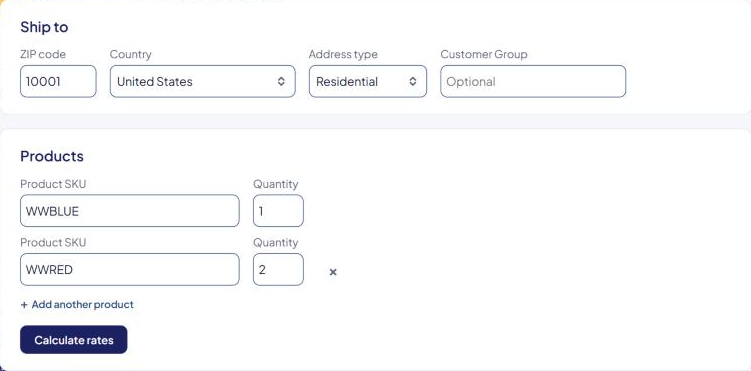
After "Calculating rates…", the results appear under Your rates: each method, its price, and how long it took. See Read Shipping Estimator results.
Testing customer tags or groups
If your store uses the Customer Tags/Groups extension, an extra field appears: Customer Tag (Shopify) or Customer Group (BigCommerce). Enter a tag or group to test rules that only apply to, or exclude, those customers. Leave it empty to quote as a regular shopper.
Tips for useful tests
- Copy the real cart. Use the same products, quantities, ZIP code and address type as the shopper who reported a problem.
- Try both address types. Carriers often price residential and commercial addresses differently, and checkout may detect the type automatically.
- Test the edges. A very light cart, a very heavy one, and a mixed cart. A nearby ZIP code and a faraway one.
- Save a screenshot of the results, including any errors below them. It's the most useful thing you can send support.
Messages you might see
- "Please enter a valid ZIP code." — the ZIP code needs at least 3 characters.
- "Please enter at least one product ID and quantity." — add a product.
Product ID "…" is not in our database.— ASM doesn't know that SKU or ID. See A product is missing in ASM ("not in our database").- "No shipping methods are available for these products and this address." — no rule passed for this cart. See No shipping methods at checkout.
If your free trial has ended and you haven't subscribed, the Shipping Estimator page is blank. See Your free trial (and extra trial days).
Check that it works
Quote a product you know well to a nearby ZIP code. You should see the methods and prices you expect. If checkout shows something different, see Why the estimator and checkout can differ.