
Free or flat shipping for a product
Make one product ship free, charge a fixed amount for it, or keep it from ever being made free by a store-wide offer. These settings override your shipping rules for that product, on the methods you choose.
Before you begin
All of them are in the Free and flat shipping section of the Edit Product page (Products → search → select the product). Each one works per shipping method, by the method's number (the #1, #2… you see on the Shipping Rules page).
Make a product ship free
- Switch Free shipping on.
- In Free shipping methods, select Add a shipping method and pick each method that should be free for this product, such as #1 Ground.
- Select Save Product.

Free shipping does nothing on its own. If Free shipping methods is empty, the product isn't free on any method.
On the methods you picked, the product costs nothing to ship and is left out of the rate ASM calculates for the rest of the cart. On every other method, it's charged as usual.
Charge a flat amount for a product
- In Flat ship rates, select Add a flat rate.
- Pick the shipping method.
- Enter the amount after $.
- Choose how it's charged:
- per unit: the amount for each unit in the cart. 3 units at $5 = $15.
- once per group: the amount once for all products in the cart that have this exact same flat rate, however many units.
- Optional: select + Quantity discount to charge a different amount from a number of units. Enter From N units: $ amount. Add as many tiers as you need.
- Read the summary under the row. It says in words what will be charged, for example "$5.00 for each unit of this product; $4.00 each from 3 units."
- Select Done, then Save Product.
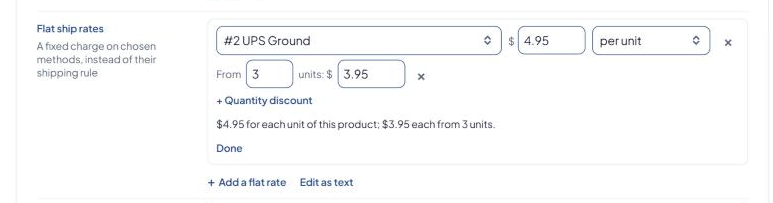
Add another flat rate for each method that should charge a fixed amount. On methods without a flat rate, the product is charged by your shipping rules.
ASM rates the rest of the cart as usual and adds the flat amount to that method's rate.
Examples
| You set | 1 unit | 4 units | 12 units |
|---|---|---|---|
| $5.99 per unit | $5.99 | $23.96 | $71.88 |
| $5 per unit, from 3 units $4, from 10 units $3 | $5 | $16 | $36 |
| $15 once per group | $15 | $15 | $15 |
| $19.99 once per group, from 3 units $30, from 6 units $45 | $19.99 | $30 | $45 |
With a quantity discount, the discounted amount applies to every unit once the cart reaches that quantity, not just the extra ones.
If the editor shows Some lines aren't in the standard "method=rate" format, so these rates can only be edited as text, the saved value uses a form the editor can't display. Edit it as text, using Product markup and flat-rate syntax.
If a product is set to ship free on a method, its flat rate and markup for that method are ignored.
Keep a product out of store-wide free shipping
Switch Global free ship exclusion on ("Charged even during store-wide free shipping"), then select Save Product.
The product is then still charged when:
- a shipping rule offers free shipping over an order amount (see Offer free shipping over an order amount), or
- the store setting Apply global free shipping if one product has free shipping set is on.
Use it for heavy or oversized items you can't afford to ship free.
Related store settings
These are in Settings → Shipping. See Global shipping settings explained.
- Count free/flat shipping weights when free/flat shipping is applied: when on, free and flat-rate products still count toward the weight of the packages ASM rates.
- Apply global free shipping if one product has free shipping set
- Count the value of excluded products toward global free shipping
Set these for many products
Use the free-shipping, free-ship-method, flat-ship-rates and global-free-ship-exclusion columns in a CSV upload. See Bulk-update products with a CSV file. The flat-rate format for CSV files is in Product markup and flat-rate syntax.
Check that it works
In the Shipping Estimator, add the product to a test cart and compare the method you changed with one you didn't.