
Add a shipping method
Add a shipping method that shows a live carrier rate at checkout, for example "UPS Ground" for addresses in the lower 48 states. You'd do this when you first set up ASM, or when you start offering a new carrier service.
Before you begin
Before you start
- To show live rates, connect the carrier account first in Settings → Carriers. See Connect a carrier account.
- If you only want a fixed price, you don't need a carrier. Follow Charge a flat rate instead.
Steps
- In the sidebar, select Shipping Rules, then Add a shipping rule.
- In the Basics card, type the Method name exactly as shoppers should see it, for example
UPS Ground.- Turbify: the name must match the shipping method name in your Turbify store exactly.
- BigCommerce: the name can be up to 100 characters.
- Optional: type a Method description (Shopify and BigCommerce). It's shown under the method name at checkout.
- In When this rule applies, leave the boxes empty. Empty means "no limit".
- In Where it ships:
- Country: select Inside, then add United States.
- States / provinces: select 48 states + DC.
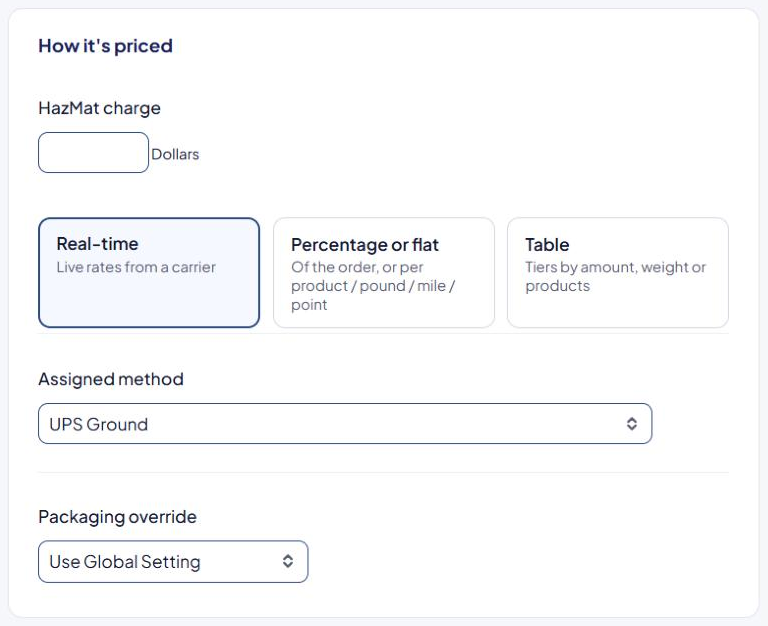
- In How it's priced, select Real-time.
- In Assigned method, choose the carrier service, for example the UPS Ground service.
- Leave Packaging override on Use Global Setting.
- Select Save Rule.
The new rule appears on the Shipping Rules list with its method number, for example "#3 UPS Ground", and the line "Real-time rate: …".
Check that it works
Run a test cart to an address in the lower 48 states in the Shipping Estimator. "UPS Ground" should appear with a live rate. See Test your rates with the Shipping Estimator.
If the rule won't save
ASM checks the form when you save. The most common messages:
| Message | What to do |
|---|---|
| "Please enter the shipping method's name exactly as it should appear in your checkout" | Fill in Method name. |
| "Please select the countries relevant for this rule" | You picked Inside or Outside but added no country. Add one, or pick Anywhere. |
| "Please select the states / provinces relevant for this rule" | You picked Choose but added no state. Add states, or pick another option. |
Optional real-time settings
These appear in How it's priced when you select Real-time:
- Packaging override — rate this rule with a carrier packaging type, such as UPS Pak or FedEx Envelope, instead of your global packaging setting.
- Saturday delivery — only shown for some overnight and express services. When it's on, tick the weekdays in Active on days when the Saturday option should be offered.
- FedEx One — only shown for some FedEx services, when FedEx One is available on your account.
If you turn on Saturday delivery and tick no days in Active on days, the rule never shows. The rule card says "Saturday delivery: No days chosen".
Related
- Offer the same method at a different price somewhere else: Charge a different rate for Alaska and Hawaii
- Price by tiers instead: Charge by weight or order total with a table
- Make it free over an amount: Offer free shipping over an order amount