
Charge a flat rate
Charge a price you set instead of a live carrier rate: a fixed amount, an amount per product or per pound, or a percentage of the order.
Before you begin
Steps
- Go to Shipping Rules and select Add a shipping rule.
- In Basics, type the Method name, for example
Standard Shipping. - In Where it ships, choose the countries and states. See Limit a method to some countries or states.
- In How it's priced, select Percentage or flat.
- Fill in one or more of the boxes below.
- Select Save Rule.
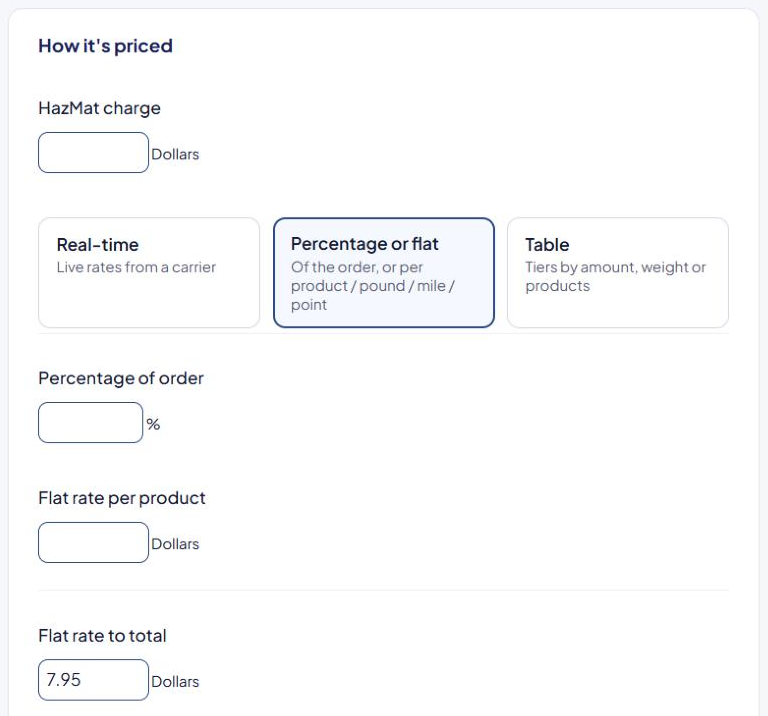
The boxes
Every box you fill in is added together. Leave the others empty.
| Box | What it charges | Example |
|---|---|---|
| Percentage of order | A percentage of the products' value | 10 on an $80 order = $8.00 |
| Flat rate to total | A fixed amount | 7.95 = $7.95 |
| Flat rate per product | An amount for each unit in the cart | 2 with 3 units = $6.00 |
| Flat rate per Pound | An amount for each pound (or your weight unit) | 1.50 on a 6 lb cart = $9.00 |
If your store uses the Distance or Points add-on, you also see Flat rate per mile and Flat rate per point.
Combining boxes
Percentage of order 10 and Flat rate to total 5, on an $80 order:
- 10% of $80 = $8.00
- plus $5.00
- shopper pays $13.00
ASM packs the cart into boxes before pricing. If your orders often pack into more than one box, test a multi-box cart in the Shipping Estimator to confirm the total is what you expect.
Common variations
- Free over an amount — add Free shipping over in the Free shipping card. See Offer free shipping over an order amount.
- A different price for some states — add a second rule with the same Method name. See Charge a different rate for Alaska and Hawaii.
- A fixed price for one product — use the product's Flat ship rates instead. See Free or flat shipping for a product.
If the rule won't save
"Please enter the values you wish to calculate shipping with…" means every box is empty. Fill in at least one. To charge nothing, type 0 in Flat rate to total.
Check that it works
Run a test cart in the Shipping Estimator and compare the price with your own math. See Test your rates with the Shipping Estimator.