
Charge a different rate for Alaska and Hawaii
Offer one method, such as "Standard Shipping", at one price in the lower 48 states and a higher price in Alaska and Hawaii. Shoppers see a single method; the price depends on their address.
Before you begin
The trick: two rules with the same Method name. They become one method with one number.
Steps
- Set up the first rule (or edit your existing one):
- Method name:
Standard Shipping - Where it ships: Country Inside + United States; States / provinces 48 states + DC
- How it's priced: Percentage or flat, Flat rate to total
7.95 - Select Save Rule.
- Method name:
- On that rule's card, select ⋯, then Duplicate.
- On the Duplicate Rule page, keep the Method name exactly the same.
- In States / provinces, select Choose, then add Alaska and Hawaii.
- Change Flat rate to total to
19.95. - Select Save Rule.
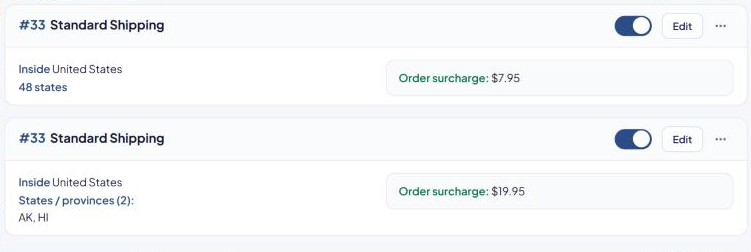
The list now shows two cards with the same number, for example "#1 Standard Shipping" twice: one for "48 states" and one for Alaska and Hawaii.
Things to know
- Keep the rules from overlapping. Each address should match only one of the two rules. "48 states + DC" doesn't include Alaska or Hawaii, so these two don't overlap.
- Free shipping is shared. If the method has Free shipping over, its Valid only to decides whether Alaska and Hawaii get it. The default, 48 States, leaves them paying. See Offer free shipping over an order amount.
- Territories: to cover Puerto Rico, Guam and other territories, add a third rule with States / provinces set to US territories.
- Live rates work too. Use Real-time in both rules, or a flat price for one and a live rate for the other.
Check that it works
In the Shipping Estimator, test one address in Texas and one in Alaska. Both should show "Standard Shipping", at $7.95 and $19.95. See Test your rates with the Shipping Estimator.