
Add a handling fee or percentage markup
Add a fee on top of a method's price, for example $2.50 handling on every UPS Ground order, or 10% on top of the live rate.
Before you begin
Steps
- In the sidebar, select Markups, then Add a markup.
- In Basics, choose the Shipping method, for example UPS Ground.
- In When it applies, leave everything empty to apply it everywhere. Or limit it by Country, States / provinces or Destination ZIP code.
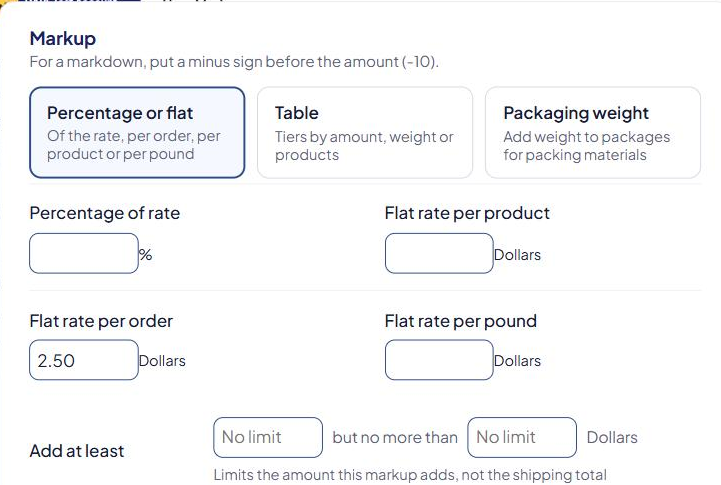
- In Markup, select Percentage or flat.
- Fill in one or more boxes:
- Flat rate per order — a fixed fee, for example
2.50. - Percentage of rate — a percentage of the shipping rate, for example
10. - Flat rate per product — an amount per unit in the cart.
- Flat rate per pound — an amount per pound (or your weight unit).
- Flat rate per order — a fixed fee, for example
- Optional: set Add at least … but no more than … to limit the fee.
- Select Save Markup.
- Check that the markup's switch is On in the list.
Examples
| Markup | Shipping rate | Shopper pays |
|---|---|---|
Percentage of rate 15 |
$20.00 | $20.00 + $3.00 = $23.00 |
Flat rate per order 2.50 |
$12.00 | $14.50 |
Percentage of rate 10 and Flat rate per order 2.50 |
$20.00 | $20.00 + $2.00 + $2.50 = $24.50 |
Flat rate per product 1 with 3 units |
$9.00 | $12.00 |
Limit the fee
Add at least … but no more than … limits the amount the markup adds, not the total.
Example: Percentage of rate 10, at least 1, no more than 5:
| Shipping rate | 10% | Fee added | Shopper pays |
|---|---|---|---|
| $8.00 | $0.80 | $1.00 (at least) | $9.00 |
| $30.00 | $3.00 | $3.00 | $33.00 |
| $80.00 | $8.00 | $5.00 (no more than) | $85.00 |
Things to know
- Markups aren't added to a $0 rate, so free shipping stays free.
- The method's Minimum charge and Maximum charge apply after the markup.
- If your orders often pack into more than one box, test a multi-box cart in the Shipping Estimator to confirm the total.
- A markup is tied to one rule of the method. If you later delete or switch off that rule, re-save the markup. See A markup stopped working.
For a fee on one product only, use the product's Markup field instead. See Add a shipping markup to a product.
Check that it works
Run a test cart in the Shipping Estimator and compare the method's price with and without the markup switched on. See Test your rates with the Shipping Estimator.