
Limit a method to some countries or states
Choose where a rule applies: one country, everywhere except some countries, the lower 48 states, or a list of states and provinces.
Before you begin
Steps
- Go to Shipping Rules and select Edit on the rule (or Add a shipping rule).
- In the Where it ships card, set Country and States / provinces as in the tables below.
- Select Save Rule.
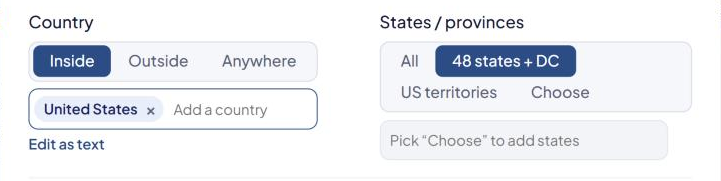
Country
| Choice | The rule applies |
|---|---|
| Inside + countries | Only to the countries you add |
| Outside + countries | Everywhere except the countries you add |
| Anywhere | To every country |
States / provinces
| Choice | The rule applies |
|---|---|
| All | To every state and province |
| 48 states + DC | To the contiguous 48 states and Washington DC (not Alaska, Hawaii or territories) |
| US territories | To American Samoa, Guam, Micronesia, Marshall Islands, Northern Mariana Islands, Palau, Puerto Rico, US Virgin Islands and the Canal Zone |
| Choose + states | Only to the states and provinces you add |
With Choose you can add US states and Canadian, Mexican, Australian and French regions, plus UK regions on Shopify.
Examples
| Goal | Country | States / provinces |
|---|---|---|
| Lower 48 only | Inside, United States | 48 states + DC |
| International only | Outside, United States | All |
| US and Canada | Inside, United States and Canada | All |
| West Coast only | Inside, United States | Choose: California, Oregon, Washington |
Excluding a few states
There's no "except" option for states. Either:
- Select Choose and add every state you do ship to, or
- Split the method into rules with the same Method name, one per area. See Charge a different rate for Alaska and Hawaii.
To stop one product shipping to some states or countries, use the product's Exclude states or Exclude countries instead. See Stop a product shipping by some methods or to some places.
If the rule won't save
| Message | What to do |
|---|---|
| "Please select the countries relevant for this rule" | You picked Inside or Outside but added no country. |
| "Please select the states / provinces relevant for this rule" | You picked Choose but added no state. |
Check that it works
In the Shipping Estimator, test one address inside the area and one outside. See Test your rates with the Shipping Estimator.