
Charge by weight or order total with a table
Charge in tiers, for example $8.95 up to 5 lb, $12.95 from 5 lb, $24.95 from 20 lb. You can also use a live carrier rate for some tiers.
Before you begin
Steps
- Go to Shipping Rules and select Add a shipping rule (or Edit an existing one).
- Fill in Basics and Where it ships.
- In How it's priced, select Table.
- Choose a Basis: what the tiers are based on.
- Fill in the rows, smallest From first. Start the first row at
0. - Need more rows? Select Add Another Row.
- Select Save Rule.
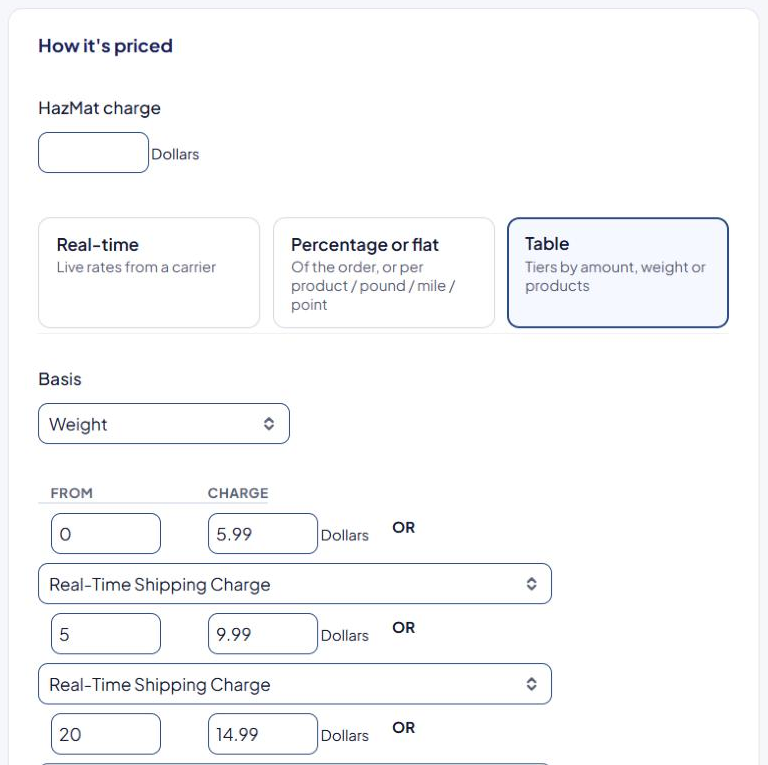
Choose a basis
| Basis | Tiers are based on | Charge is |
|---|---|---|
| Amount | The value of the products | A fixed amount |
| Amount (Percentage) | The value of the products | A percentage of that value |
| Weight | The weight, in your store's weight unit | A fixed amount |
| Products | The number of units | A fixed amount |
With add-ons you may also see Points and a distance basis (Miles or Kilometers).
How a row is chosen
ASM reads the rows from top to bottom and uses the last row whose From is less than or equal to the value.
Example, Basis = Weight:
| From | Charge |
|---|---|
| 0 | 8.95 |
| 5 | 12.95 |
| 20 | 24.95 |
| Cart weight | Shopper pays |
|---|---|
| 3 lb | $8.95 |
| 7 lb | $12.95 |
| 20 lb | $24.95 |
On the rule card the table reads "0 - 4.99", "5 - 19.99" and "20 and up".
Always enter rows smallest first and start the first row at 0. Otherwise small orders may not match any row.
Tables are priced per box
ASM packs the cart into boxes first, then looks up and charges each box separately.
Example with the weight table above: a cart packed into two 15 lb boxes pays 2 × $12.95 = $25.90, not $12.95.
If a table rate comes out at exactly two or three times a row's charge, the cart was packed into that many boxes. See My table rate is charged two or three times.
Tiers by order total
With Basis = Amount, each box is tiered by the value of the products in that box. To tier by the whole order instead, go to Settings and set Base table-amount shipping rules on to Order value. See Global shipping settings explained.
Example, Basis = Amount, based on Order value:
| From | Charge |
|---|---|
| 0 | 9.99 |
| 50 | 4.99 |
| 100 | 0 |
Orders under $50 pay $9.99, $50 to $99.99 pay $4.99, and $100 or more ship free. Test a cart that packs into several boxes in the Shipping Estimator to confirm the total.
Use a live carrier rate for some tiers
Each row can use a live rate instead of a fixed charge. Leave Charge empty and, next to OR, pick a carrier service in the Real-Time Shipping Charge dropdown on that row.
Example, Basis = Amount:
| From | Charge | OR |
|---|---|---|
| 0 | (empty) | UPS Ground |
| 150 | 0 | (none) |
Orders under $150 pay the live UPS Ground rate; orders of $150 or more ship free.
If the rule won't save
| Message | What to do |
|---|---|
| "Please enter the charge for all populated "From" values or select a Real-Time shipping method" | A row has a From but no charge. Fill it in or clear the row. |
| "Please enter the "From" value for all populated charges and Real-Time shipping methods" | A row has a charge but no From. |
| "Please enter the "From" and charge value(s) or Real-Time shipping method(s)" | The table is empty. |
Check that it works
Test carts at the edges of your tiers in the Shipping Estimator, for example 4.9 lb and 5 lb. See Test your rates with the Shipping Estimator.