
Vary a markup by amount, weight or number of products
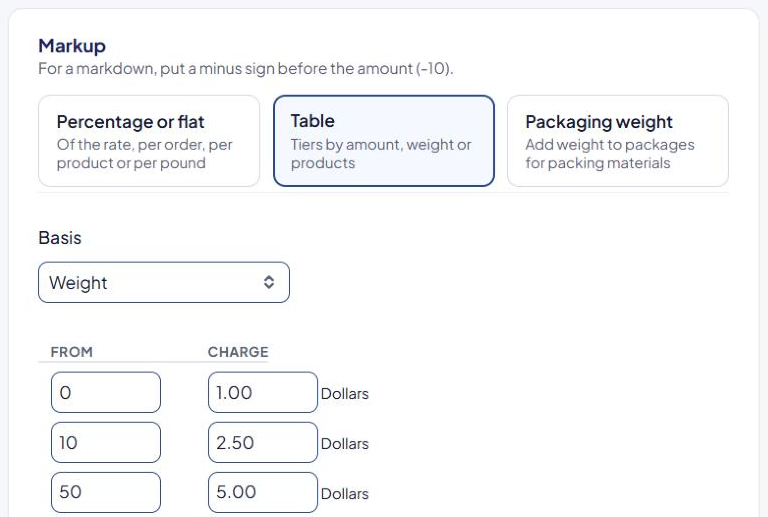
Charge a markup that changes with the order, for example $1.00 handling up to 10 lb, $2.50 from 10 lb and $5.00 from 50 lb. You do this with a markup Table.
Before you begin
Steps
- In the sidebar, select Markups, then Add a markup (or Edit an existing one).
- Choose the Shipping method and, if needed, limit When it applies.
- In Markup, select Table.
- Choose a Basis (see below).
- Fill in From and Charge, smallest From first, starting at
0. Select Add Another Row for more rows. - Optional: set Add at least … but no more than ….
- Select Save Markup.
Choose a basis
| Basis | Tier is picked by | Charge adds |
|---|---|---|
| Amount | Value (see the setting below) | A fixed amount |
| Amount (Percentage) | Value (see the setting below) | A percentage of the shipping rate |
| Weight | Weight | A fixed amount |
| Weight (Percentage) | Weight | A percentage of the shipping rate |
| Products | Number of units | A fixed amount |
| Products (Percentage) | Number of units | A percentage of the shipping rate |
The row used is the last row whose From is less than or equal to the value, just like a shipping rule table.
What "Amount" is based on
Base table-amount markup rules on, in Settings, decides the value an Amount table looks at:
- Package value — the value of the products in each box.
- Order value — the whole order's value.
- Shipping rate — the method's shipping rate.
See Global shipping settings explained.
Examples
Basis Weight:
| From | Charge |
|---|---|
| 0 | 1.00 |
| 10 | 2.50 |
| 50 | 5.00 |
A 6 lb package adds $1.00; a 12 lb package adds $2.50.
Basis Amount (Percentage), based on Shipping rate:
| From | Charge |
|---|---|
| 0 | 20 |
| 25 | 10 |
A $15 rate adds 20% ($3.00). A $40 rate adds 10% ($4.00).
If your orders often pack into more than one box, test a multi-box cart in the Shipping Estimator to confirm the markup comes out as you expect.
Check that it works
Test carts on each side of your tiers in the Shipping Estimator. See Test your rates with the Shipping Estimator.