
Turn rules on or off, duplicate or delete them
Manage the rules on your Shipping Rules page: switch a rule off for a while, copy it as a starting point, or remove it.
Before you begin
Find a rule
- Use the search box (Search rules, zips, SKUs) at the top of the list.
- Use All / On / Off to show only the rules that are switched on, or off.
Turn a rule on or off
- Go to Shipping Rules.
- Select the switch on the rule's card.
Only rules that are On are used at checkout. Turning one rule off removes only that rule. Other rules of the same method keep working.
To stop offering a method for a while, switch off every rule of that method. Switching off is easy to undo; deleting isn't.
Duplicate a rule
Duplicating is the quickest way to make a similar rule, or to add a rule to an existing method.
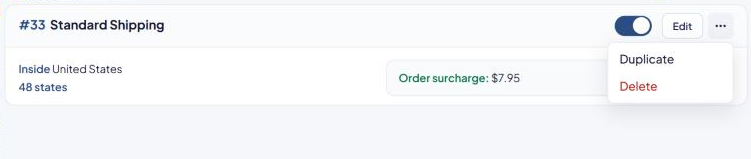
- On the rule's card, select ⋯, then Duplicate.
- The Duplicate Rule page opens with a copy of every setting.
- Change what you need.
- Select Save Rule.
What happens to the name:
- Keep the same Method name — the copy becomes another rule of the same method, with the same number. Use this to give a method a different price in other states, for example.
- Change the Method name — the copy becomes a new method with its own number.
Duplicate is the safest way to add a rule to an existing method. The copy starts with all the method's shared settings, including its Advanced triggers. If you use Add a shipping rule instead, check that the new rule's Advanced triggers card matches the method's other rules before you save it again.
Delete a rule
- On the rule's card, select ⋯, then Delete.
- In Delete this shipping rule?, select Delete rule.
Deleting can't be undone.
Deleting a rule can affect other rules:
- If another method has an Another method is offered trigger that points at this method, ASM may clear that trigger and switch that rule off. After deleting, select Off at the top of the list to check.
- A markup saved with this rule stops applying and disappears from Markups. See A markup stopped working.
Check that it works
Run a test cart in the Shipping Estimator to see which methods now show. See Test your rates with the Shipping Estimator.