
Add packing-material weight to packages
Carriers charge for the box and packing material too. A Packaging weight markup adds that weight to each package before it's rated, so live rates match what you'll actually pay.
Before you begin
Steps
- In the sidebar, select Markups, then Add a markup.
- In Basics, choose the Shipping method.
- In When it applies, limit it if needed, or leave it empty.
- In Markup, select Packaging weight.
- Fill in the rows:
- From — the package weight this row starts at.
- Add — the weight to add.
- Start at
0and enter rows smallest first. Select Add Another Row for more. - Select Save Markup.
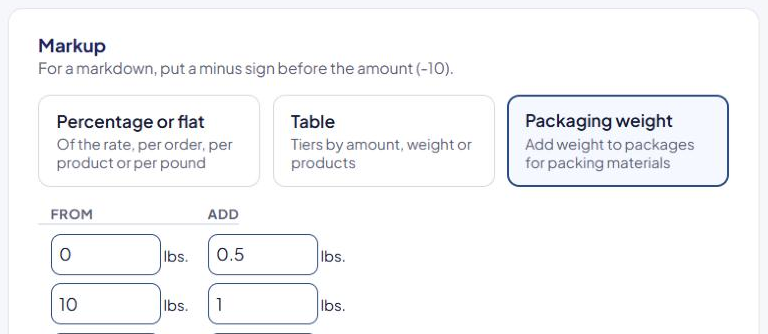
Example
| From | Add |
|---|---|
| 0 | 0.5 |
| 10 | 1 |
| Package | Rated at |
|---|---|
| 4 lb | 4.5 lb |
| 12 lb | 13 lb |
Each package uses the last row whose From is less than or equal to its weight. Weights are in your store's weight unit.
The markup card shows the table as "Package weight" and "Weight added".
Things to know
- It only changes prices that depend on weight: live carrier rates, Flat rate per pound and weight tables.
- It's added after ASM decides which rules apply. A rule's Weight range still uses the products' weight without packaging.
- Each package uses one Packaging weight markup. Keep one per method (or one per origin).
Check that it works
Run a test cart in the Shipping Estimator and look at the package weights it shows. See Read Shipping Estimator results.