
Limit a method by ZIP or postal code
Make a rule apply only to certain destination ZIP codes, for example a "Local Delivery" method for ZIPs 33400 to 33499.
Before you begin
Labels say ZIP code for stores that ship from the US and postal code for others.
One code or a range
- Go to Shipping Rules and select Edit on the rule (or Add a shipping rule).
- In Where it ships, type in Destination ZIP code:
- one code, for example
33401, or - a range, for example
33400-33499.
- one code, for example
- Select Save Rule.
The rule card shows "Destination zip codes: …".
Ranges compare numbers, so they work only for numeric codes like US ZIPs. For Canadian or UK postal codes, use a ZIP code list (below).
ZIP code lists and exclusions
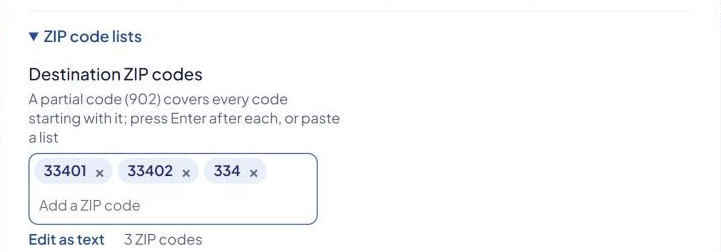
If your store has ZIP code lists turned on, Where it ships has a ZIP code lists section. These are turned on by support; contact us if you need them.
- Destination ZIP codes — the rule applies only to these codes.
- Exclude destination ZIP codes — the rule never applies to these codes.
Press Enter after each code, or paste a list.
How codes match:
- A partial code covers every code that starts with it.
902covers90210and90245. - Upper or lower case doesn't matter, so
M5Vcoversm5v 2t6.
When a list is set, the single Destination ZIP code field is replaced by the list.
Examples
| Goal | Set |
|---|---|
| Local delivery for 33401 only | Destination ZIP code 33401 |
| One numeric range | Destination ZIP code 33400-33499 |
| Every ZIP starting 902 or 903 | Destination ZIP codes 902, 903 |
| Everywhere except ZIPs starting 995–999 (Alaska) | Exclude destination ZIP codes 995, 996, 997, 998, 999 |
Origin ZIP code is different
Origin ZIP code, in the same card, is about where products ship from, not where they go. See Rules for products that ship from different origins.
Check that it works
In the Shipping Estimator, test an address inside your codes and one outside. See Test your rates with the Shipping Estimator.