
Stop a product shipping by some methods or to some places
Keep a product from shipping by certain methods (for example, no air shipping for a heavy item), or from shipping to certain states, provinces or countries.
Before you begin
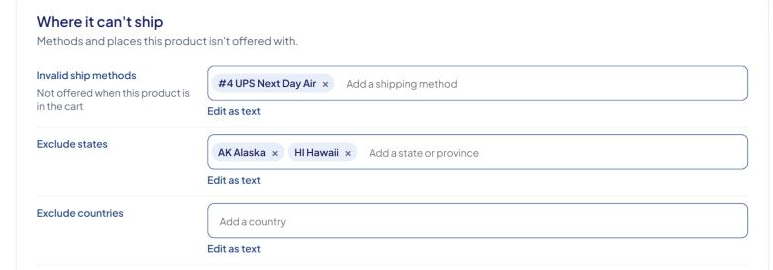
These settings are in the Where it can't ship section of the Edit Product page (Products → search → select the product).
Block shipping methods for a product
- In Invalid ship methods ("Not offered when this product is in the cart"), select Add a shipping method and pick each method to block, for example #3 Next Day Air.
- Select Save Product.
While this product is in the cart, those methods aren't offered, even for the other items in the order. The shopper can still choose any other method.
Block shipping to states or provinces
- In Exclude states, select Add a state or province and pick each one. The list is grouped by country.
- Select Save Product.
When this product is in the cart and the shipping address is in one of those states, ASM offers no shipping method at all for that order.
Block shipping to countries
- In Exclude countries, select Add a country and pick each one.
- Select Save Product.
This works like Exclude states: no method is offered to those countries while the product is in the cart.
Excluding a state or country blocks the whole order for those shoppers, not just this product. Use it only for products you truly can't ship there.
Type or paste a long list
Each picker has Edit as text. It shows the saved codes separated by spaces, so you can paste a long list:
- Methods: method numbers, such as
2 3 7. - States: two-letter codes, such as
AK HI PR. - Countries: two-letter codes, such as
CA MX.
Select Pick from the list to go back. A saved code that isn't in the list stays as a "(not in list)" chip, so opening and saving a product never loses a code.
What shoppers see
Where your checkout shows ASM's messages (for example on Turbify), shoppers see one of these default messages:
| Cause | Default message |
|---|---|
| A method in Invalid ship methods | One or more items in your cart are restricted not to use the shipping method that you chose. |
| The address is in Exclude states | One or more items in your cart are restricted not to ship to your shipping state. |
| The address is in Exclude countries | One or more items in your cart are restricted not to ship to your shipping country. |
On Turbify, you can change the wording in Settings → Error Messages. See Customize shopper error messages (Turbify).
The "restricted not to use the shipping method" message also appears when no shipping rule matches the order at all. It doesn't always mean a product restriction. See "Restricted not to use the shipping method" — what it really means.
Restrict many products at once
Use the invalid-ship-methods, exclude-states and exclude-countries columns in a CSV upload, with codes separated by spaces. See Bulk-update products with a CSV file.
Check that it works
In the Shipping Estimator, add the product to a test cart and enter an address you blocked. The blocked methods, or all methods, should be missing. Then try an address you didn't block.