
Temperature sensor for perishable products
The Temperature Sensor add-on protects perishable products in hot weather. When the forecast at your origin or the shopper's address reaches a temperature you set, ASM can add a fee, add weight (for ice packs) or block slow shipping methods.
How it works
- You mark which products are perishable.
- For each quote, ASM looks up the weather forecast for the origin ZIP and the destination ZIP. It uses the average of the daily highs over the next few days, in degrees Fahrenheit.
- If either location reaches your threshold and the cart has a perishable product, the rules below apply.
Carts with no perishable product are never affected.
Before you start
- The Temperature Sensor add-on on your store. With it, Settings → Temperature Sensor appears. See Plans and extensions.
- Perishable products marked. Set each perishable product's Perishable (Y/N) field to Y. See Add-on product fields.
Steps
- Go to Settings → Temperature Sensor.
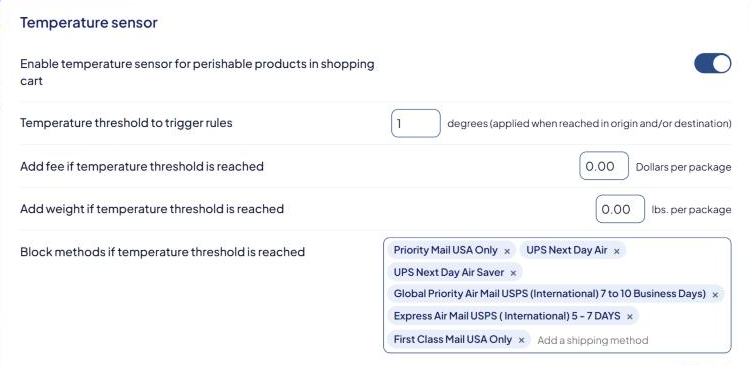
- Turn on Enable temperature sensor for perishable products in shopping cart.
- Enter Temperature threshold to trigger rules, in degrees Fahrenheit, for example
80. It applies when the origin or destination reaches it. - Choose what happens when the threshold is reached. Use any combination:
- Add fee if temperature threshold is reached — dollars added per package, for example for insulated packaging.
- Add weight if temperature threshold is reached — weight added per package, for example for ice packs. The carrier rate is calculated with the extra weight.
- Block methods if temperature threshold is reached — select Add a shipping method to add slow methods (such as ground services) that shouldn't carry perishables in the heat.
- Optional: Exclude the following states from blocked methods — select Add a state or province for places where blocked methods should still be offered.
- Optional (Product Shipping Calculator or populator): Text message to show when threshold is reached.
- Select Save Settings.
If you block every method a shopper could use, they get no shipping options. Keep at least one fast method unblocked for hot destinations.
Check that it works
Use the Shipping Estimator with a perishable product and a destination in a hot area. When the threshold is reached, blocked methods are missing, any extra weight shows in the package details, and the rates include your fee. Try a non-perishable product to the same address to compare. See Test your rates with the Shipping Estimator.
Good to know
- The fee is per package, so a cart packed into two boxes pays it twice.
- Excluded states only affect blocking. The fee and extra weight still apply there.
- The threshold is in Fahrenheit, even if your store uses metric units.