
Show only the cheaper of two methods
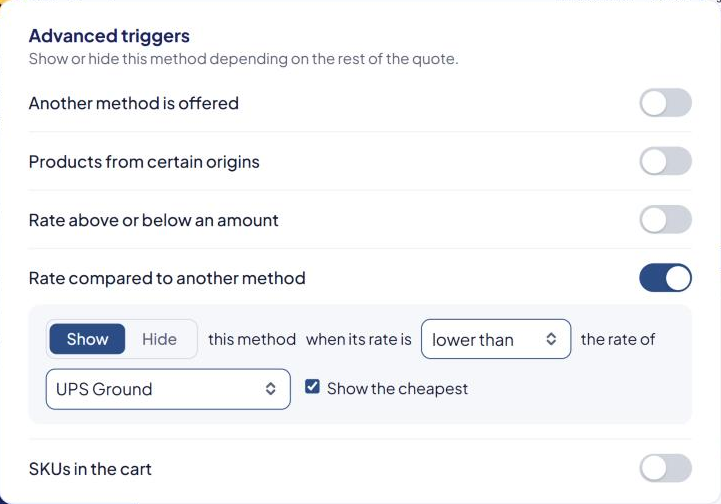
Offer UPS Ground and FedEx Ground, but show shoppers only whichever is cheaper for their cart. You do this with the Rate compared to another method trigger.
Before you begin
In this example, UPS Ground is method #2 and FedEx Ground is method #5.
Steps
- Go to Shipping Rules and select Edit on a rule of FedEx Ground (#5).
- Scroll to Advanced triggers and find Rate compared to another method.
- Turn its switch on.
- Set the sentence to: Show this method when its rate is lower than the rate of UPS Ground.
- Tick Show the cheapest.
- Select Save Rule.
The FedEx Ground card now says "Show only if the rate is lower than #2's; when this shows, #2 is hidden".
What shoppers see
| FedEx Ground | UPS Ground | Shown at checkout |
|---|---|---|
| $11.20 | $12.80 | FedEx Ground only |
| $14.10 | $12.80 | UPS Ground only |
- Lower than with Show hides FedEx Ground when it costs more.
- Show the cheapest hides UPS Ground whenever FedEx Ground stays.
If the two rates are exactly equal, which one shows isn't guaranteed.
Things to know
FedEx Ground (the method with the trigger) is also hidden when:
- UPS Ground isn't offered for this cart — for example no UPS Ground rule matches, or UPS returns an error. A UPS outage can then leave neither method.
- Either rate is $0, for example because free shipping applies.
- Set the trigger on one method only. Don't add a second trigger on UPS Ground pointing back at FedEx Ground.
- Keep it one level deep. Don't compare against a method that has its own compare trigger. See Advanced triggers reference.
- The comparison uses each method's final price, after markups and minimum or maximum charge.
Check that it works
In the Shipping Estimator, test a few carts with different weights and destinations. Only one of the two methods should show each time. See Test your rates with the Shipping Estimator.
If a method vanishes when you don't expect it, see A method disappeared after I changed another rule.