
Rules for products that ship from different origins
If some products ship from another warehouse or a supplier, you can price the boxes from each origin differently. You do this with the rule's Origin ZIP code.
Before you begin
How an origin rule works
- A rule with an Origin ZIP code applies only when the cart has a product shipping from that ZIP code.
- It prices only the boxes that ship from that origin.
- Boxes from your main origin, or from other origins, are priced by the method's rules without an origin.
- The method's price is the total of all its boxes.
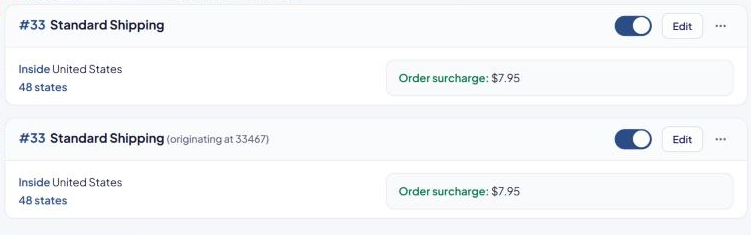
The rule card shows "(originating at 12345)" next to the method name.
Products get their origin on the product page. See Ship a product from a different origin.
Steps
Example: a method called "Ground Shipping" uses the live UPS Ground rate from your main warehouse, but boxes from a supplier at ZIP 33467 should use the supplier's FedEx Ground rate.
- Keep your existing Ground Shipping rule as it is, with Origin ZIP code empty.
- On that rule's card, select ⋯, then Duplicate. Keep the same Method name.
- In Where it ships, type
33467in Origin ZIP code. - In How it's priced, keep Real-time and choose the FedEx Ground service in Assigned method.
- Select Save Rule.
A cart with products from both origins gets the UPS Ground rate for the main-warehouse boxes plus the FedEx Ground rate for the supplier's boxes, shown as one "Ground Shipping" price.
Every origin in the cart needs a rule that can price it. If a cart has products from an origin with no matching rule, the shopper can see "There was a problem calculating the shipping rates for the items in your cart." Keep at least one rule without an origin for each method.
Typing your store's own origin ZIP code in Origin ZIP code has no effect: it's cleared when you save, because that rule already covers your main origin.
Ignore origins for one rule
In Products and customers, turn on Ignore product origin ZIP codes to treat every product as shipping from your main origin for this rule. The card says "Ignores product origin ZIP codes".
Use it, for example, for a "Local Pickup" method where origin doesn't matter.
Show or hide a method by origin
To offer a method only when products from an origin are in the cart, use the Products from certain origins trigger. See Advanced triggers reference.
Markups by origin
A markup on the Markups page can also have an Origin ZIP code ("Products shipping from this ZIP code"). It then applies only to boxes from that origin. See How markups work.
Check that it works
In the Shipping Estimator, test a cart with products from each origin, then a mixed cart. See Test your rates with the Shipping Estimator.