
Connect TForce Freight (formerly UPS Freight)
UPS Freight is now TForce Freight, and UPS no longer returns its freight rates. To keep quoting LTL freight, connect your own TForce Freight account. Your rates are your own TForce rates, including any negotiated discount.
Before you begin
Your existing UPS Freight (UPS LTL) shipping methods keep working once TForce is connected. You don't need to rebuild them, and they keep the names you gave them.
Before you start
- UPS must be connected too. TForce rates only run when your UPS account is connected. See Connect UPS.
- A TForce Freight account. If you don't have one, you can sign up on TForce's page during the steps below.
- The TForce Freight card in Settings → Carriers. It appears with the TForce Freight add-on. If you don't see it, contact support.
Steps
- Go to Settings → Carriers and select TForce Freight.
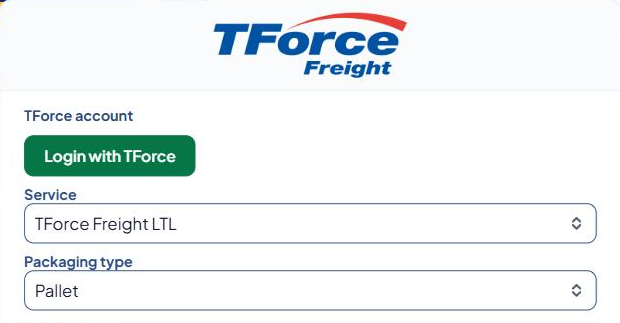
- Under TForce account, select Login with TForce. TForce's page opens in a new tab.
- Log in to TForce (or sign up), then approve Advanced Shipping Manager.
- Go back to ASM and refresh the page. The card says Your TForce account is connected.
- Set the freight options:
- Service — TForce Freight LTL, or TForce Freight LTL - Guaranteed.
- Packaging type — how your freight is packed (pallet, crate and so on).
- Freight class — the class used when a product has none. See LTL freight in ASM.
- Accessorials — extra pickup or delivery services, such as inside delivery, residential or lift-gate. Each one you pick is added to every quote.
- Select Save Settings.
- Select Test connection.
Check that it works
A working connection shows "Connected. TForce Freight quoted $… for a 300 lb pallet to …". Then quote a cart that uses your freight method in the Shipping Estimator. See Test your rates with the Shipping Estimator.
Keep the connection working
ASM renews the connection automatically. You'll need to log in again if:
- you revoke ASM's access in your TForce account, or
- TForce stops accepting the renewal (a connection that can't be renewed for 90 days expires).
When that happens, the card says "Your TForce connection expired. Please log in again.", the tile shows Reconnect needed, and every admin page shows the banner TForce Freight needs to be reconnected. Select Login with TForce and log in again. You can also select Reconnect TForce at any time to redo the connection.
Common problems
Test says "TForce rates only run when your UPS account is connected too."
- Connect UPS first, then test again. See Connect UPS.
Test says "Log in with TForce first, then test again."
- The card isn't connected yet. Follow the steps above.
Test says "Your TForce connection expired…" or "…couldn't be renewed."
- Select Login with TForce (or Reconnect TForce) and log in again, then test.
"Handling unit dimensions are required"
- Your TForce account is priced by density, and the product has no dimensions. Add dimensions to the product. See Set dimensions, boxes and "ship alone".
Banner "Connect TForce Freight"
- You have UPS Freight methods but no TForce connection, so those methods return no rates. Follow the steps above.