
Shipping insurance
The Insurance add-on puts a shipping insurance option in your cart. The shopper can turn it on or off, and the price is a percentage of the cart subtotal, with an optional minimum and maximum.
This is separate from Declare value on shipments under Settings → Shipping, which sends the package value to the carrier. See Global shipping settings explained.
Before you start
- The Insurance add-on on your store. With it, Settings → Insurance appears. See Plans and extensions.
- BigCommerce and Turbify: a product in your store that represents insurance, and its product ID or SKU. ASM adds it to the cart when the shopper chooses insurance.
- BigCommerce and Turbify: an access token from your platform with the Carts modify permission, so ASM can add and remove that product.
Steps
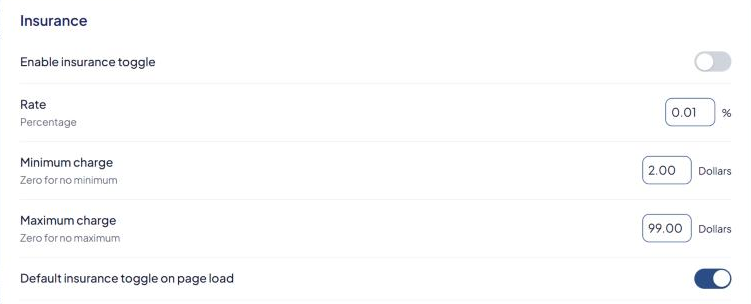
- Go to Settings → Insurance.
- BigCommerce and Turbify: turn on Enable insurance toggle.
- Set Rate — the percentage of the cart subtotal, for example
2for 2%. - Set Minimum charge and Maximum charge in dollars. Enter
0for no minimum or no maximum. - Turn on Default insurance toggle on page load if insurance should start switched on. The shopper can still turn it off.
- Shopify: enter the Product name shoppers see at checkout and in the order confirmation.
- BigCommerce and Turbify:
- Product ID/SKU — must match the insurance product exactly as it's set up in your platform.
- Access token with "Carts modify" permission.
- Pop-up information — the text shown when the shopper selects the info icon.
- First line verbiage (there are two fields with this name) — the first is shown when the shipment is protected, the second when it isn't. For example "Your Shipment Is Protected" and "Your Shipment Is Not Protected".
- Second line verbiage — the line under it, for example "from Damage, Loss & Theft".
- Select Save Settings.
How the price is worked out
Insurance = cart subtotal × Rate, then raised to the Minimum charge or lowered to the Maximum charge if needed.
Example: Rate 2, Minimum charge 1.50, Maximum charge 25.
- $40 cart → 2% is $0.80, so the shopper pays the $1.50 minimum.
- $300 cart → $6.00.
- $2,000 cart → 2% is $40, so the shopper pays the $25 maximum.
Check that it works
Add products to your storefront cart and look for the insurance option. Turn it on and off and check the price changes. If the option doesn't appear at all, contact support. We'll check it's installed on your storefront.