
See who changed what: the Activity Log
The Activity Log shows sign-ins and changes made in the ASM admin over the last 14 days, newest first. Use it to find out who changed a setting, when a rule was edited, or why you were signed out.
Steps
- Go to Activity Log in the ASM menu. Or, on the Dashboard, select View the activity log → under Recent activity.
- To narrow the list, choose an action in What, set From and To dates, and select Filter.
- Select an entry to see exactly what changed. Field names are in plain words.
- Select Clear to remove your filters.
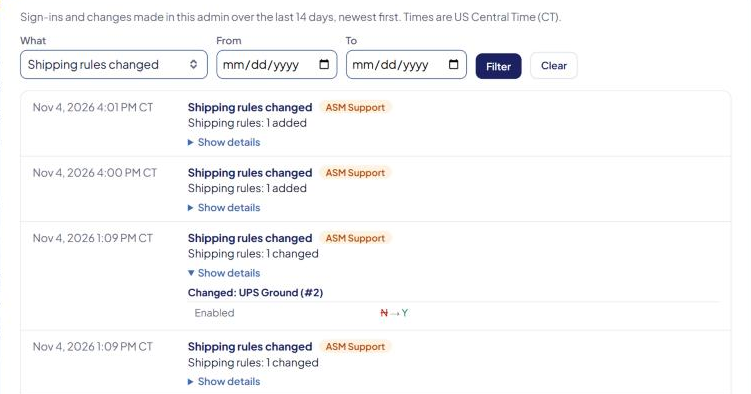
The log shows 25 entries per page. Use ← Newer and Older → to move between pages. Times are US Central Time (CT).
What's recorded
You can filter by these actions:
- Signed in, Failed sign-in, Signed out
- Password reset, Phone verified
- Settings changed
- Shipping rules changed
- Markups changed
- Product edited, Products imported
- Full product sync requested, Full product sync finished, Full product sync failed
Each entry also shows who did it:
- Store user — someone signed in to your store's ASM account.
- ASM Support — our team, working on a request.
- Automatic — ASM itself, such as a product sync.
Passwords and other secrets never appear. The log only notes that one changed.
What's not recorded
- Changes made in Shopify or BigCommerce. Editing a product in your store admin isn't logged here, even though ASM picks the change up. A full product sync gets one entry.
- Some pages, such as Taxes and delivery zones.
- Anything older than 14 days.
Check that it works
Change a setting and save it. A Settings changed entry appears at the top of the log.
Messages you might see
- "No activity in the last 14 days." — nothing has been signed in or changed.
- "No activity matches these filters." — widen your dates or choose All activity in What.
- "Those filters aren't valid. Check the dates and try again." — fix the From and To dates, or select Clear.
- "The activity log couldn't be loaded right now. Please try again in a few minutes."